pi-openui 0.1.0 → 0.1.2
This diff represents the content of publicly available package versions that have been released to one of the supported registries. The information contained in this diff is provided for informational purposes only and reflects changes between package versions as they appear in their respective public registries.
- package/CHANGELOG.md +15 -0
- package/README.md +37 -60
- package/package.json +3 -2
- package/src/diagram/canvas.ts +20 -14
- package/src/diagram/infra.ts +2 -1
- package/src/diagram/wide.ts +36 -0
- package/src/lang/docs.ts +1 -1
package/CHANGELOG.md
CHANGED
|
@@ -2,6 +2,21 @@
|
|
|
2
2
|
|
|
3
3
|
## Unreleased
|
|
4
4
|
|
|
5
|
+
## 0.1.2 (2026-10-31)
|
|
6
|
+
|
|
7
|
+
- Fixed borders drawn out of line on rows with wide characters. The terminal draws emoji and many symbols (✅ ❌ ⚡ 🚀 ⭐ ☕
|
|
8
|
+
and about 8,800 more) two cells wide, and the widgets counted them as one, so everything to their right on that row, and the
|
|
9
|
+
right border, slid by a cell. The widgets now measure with the same table pi uses. The `storage` icon of an InfraNode was one
|
|
10
|
+
of these characters (U+2630); it is now ⊟.
|
|
11
|
+
- The README now says what to do when the widget does not appear because pi-compact-tools collapses the tool call into a
|
|
12
|
+
"Called render_widget" row: exclude `render_widget` in its config. Nothing changes in the extension.
|
|
13
|
+
|
|
14
|
+
## 0.1.1 (2026-10-30)
|
|
15
|
+
|
|
16
|
+
- The README now renders on pi.dev and npm: screenshots are markdown images (pi.dev drops raw HTML tables and images) and
|
|
17
|
+
links to the documentation are absolute (pi.dev rewrote the relative ones to a CDN copy of the package, which has no `docs/`).
|
|
18
|
+
Nothing changes in the extension.
|
|
19
|
+
|
|
5
20
|
## 0.1.0 (2026-10-30)
|
|
6
21
|
|
|
7
22
|
- **Notes.** Pin a comment to a table cell, node, slice, point or paragraph; the notes go into pi's message box as one numbered
|
package/README.md
CHANGED
|
@@ -6,22 +6,9 @@ coding agent. The agent writes a few lines of OpenUI Lang. pi draws a widget you
|
|
|
6
6
|
It uses unicode characters, and real pictures where the terminal can show them. There is no browser, no HTML, no runtime
|
|
7
7
|
dependency and no network access.
|
|
8
8
|
|
|
9
|
-
|
|
10
|
-
|
|
11
|
-
|
|
12
|
-
<td valign="top"><img src="docs/screenshots/dag-tooltip.png" width="360" alt="A CI pipeline graph with a focused node, a hint bubble and its tooltip panel"></td>
|
|
13
|
-
</tr>
|
|
14
|
-
<tr>
|
|
15
|
-
<td valign="top"><img src="docs/screenshots/infra.png" width="440" alt="An infrastructure map with three zones"></td>
|
|
16
|
-
<td valign="top"><img src="docs/screenshots/image-tooltip.png" width="360" alt="A picture in a frame with a tooltip bubble"></td>
|
|
17
|
-
</tr>
|
|
18
|
-
<tr>
|
|
19
|
-
<td valign="top"><img src="docs/screenshots/notes-tray.png" width="440" alt="Two notes pinned on a table, with a tray listing them"></td>
|
|
20
|
-
<td valign="top"><img src="docs/screenshots/markdown-image.png" width="360" alt="A README-style view: one markdown with a picture between its paragraphs"></td>
|
|
21
|
-
</tr>
|
|
22
|
-
</table>
|
|
23
|
-
|
|
24
|
-
<sub>Screenshots are drawn by `npm run screenshots` from the widget's real output, with pi's dark theme and JetBrains Mono.</sub>
|
|
9
|
+
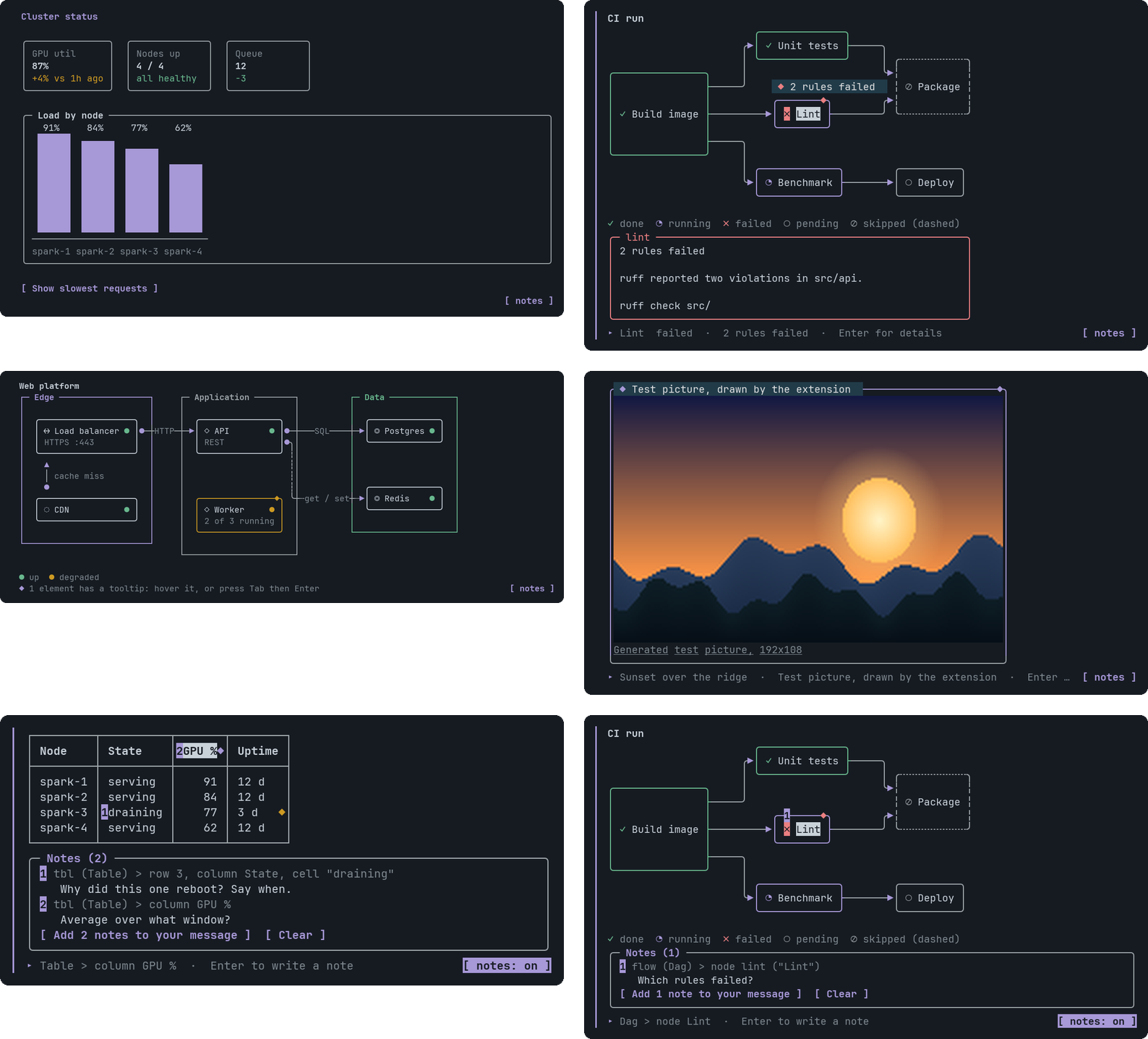
|
|
10
|
+
|
|
11
|
+
*Screenshots are drawn by `npm run screenshots` from the widget's real output, with pi's dark theme and JetBrains Mono.*
|
|
25
12
|
|
|
26
13
|
## What you get
|
|
27
14
|
|
|
@@ -29,18 +16,18 @@ dependency and no network access.
|
|
|
29
16
|
numbers, so it fixes them and tries again. After a successful draw it says one short sentence.
|
|
30
17
|
- **23 components.** Layout and text, metric tiles, tables, tabs, buttons and choices, FAQ, markdown, code with
|
|
31
18
|
highlighting and a copy button, images, bar, line, area, pie and radar charts, a world map, and four diagram types
|
|
32
|
-
(DAG, ER, infrastructure map, sequence). See the [component gallery](docs/components/README.md).
|
|
19
|
+
(DAG, ER, infrastructure map, sequence). See the [component gallery](https://github.com/newtonapple/pi-openui/blob/main/docs/components/README.md).
|
|
33
20
|
- **Interaction.** Click, or use Tab, the arrow keys, Enter and Esc. A button or a choice sends text to the agent as your next
|
|
34
|
-
message. See [docs/interaction.md](docs/interaction.md).
|
|
21
|
+
message. See [docs/interaction.md](https://github.com/newtonapple/pi-openui/blob/main/docs/interaction.md).
|
|
35
22
|
- **Notes.** Pin a comment to a table cell, a graph node or a pie slice, then send all of them to the agent as one numbered
|
|
36
23
|
message. You read and edit the message before it goes. See [Notes](#notes).
|
|
37
24
|
- **Tooltips.** An element with a tooltip shows a small `◆`. Hover for a hint bubble, click or press Enter for a panel with
|
|
38
|
-
detail, code and a link. See [Tooltip](docs/components/Tooltip.md).
|
|
25
|
+
detail, code and a link. See [Tooltip](https://github.com/newtonapple/pi-openui/blob/main/docs/components/Tooltip.md).
|
|
39
26
|
- **Pictures.** An `Image` draws the real picture in terminals that speak the Kitty graphics protocol, inside a frame that
|
|
40
27
|
can carry a tooltip. A line of Markdown that is only a picture, ``, is drawn the same way, so a
|
|
41
|
-
README-style view is one `Markdown`. See [Image](docs/components/Image.md) and [Markdown](docs/components/Markdown.md).
|
|
28
|
+
README-style view is one `Markdown`. See [Image](https://github.com/newtonapple/pi-openui/blob/main/docs/components/Image.md) and [Markdown](https://github.com/newtonapple/pi-openui/blob/main/docs/components/Markdown.md).
|
|
42
29
|
- **Robust diagrams.** Every graph, schema and map is routed on a character grid with one wire per edge. The tests decode
|
|
43
|
-
the finished picture back into its edges and compare them with the input. See [docs/diagrams.md](docs/diagrams.md).
|
|
30
|
+
the finished picture back into its edges and compare them with the input. See [docs/diagrams.md](https://github.com/newtonapple/pi-openui/blob/main/docs/diagrams.md).
|
|
44
31
|
|
|
45
32
|
## Install
|
|
46
33
|
|
|
@@ -63,7 +50,7 @@ and run `/openui-gallery`. It needs pi 1.4 or newer.
|
|
|
63
50
|
| Remove | `pi remove npm:pi-openui` |
|
|
64
51
|
|
|
65
52
|
It is in pi's [package catalog](https://pi.dev/packages), which lists npm packages that carry the `pi-package` keyword. After an
|
|
66
|
-
update pi shows this package's [changelog](CHANGELOG.md). Maintainers: see [docs/releasing.md](docs/releasing.md).
|
|
53
|
+
update pi shows this package's [changelog](CHANGELOG.md). Maintainers: see [docs/releasing.md](https://github.com/newtonapple/pi-openui/blob/main/docs/releasing.md).
|
|
67
54
|
|
|
68
55
|
## Use it
|
|
69
56
|
|
|
@@ -85,56 +72,36 @@ The mouse needs pi's default fullscreen mode. Everything also works from the key
|
|
|
85
72
|
Pin a comment to one part of a widget, then send all your comments to the agent as a single message. Use it to say "this row
|
|
86
73
|
is wrong" or "explain this node" without describing where it is.
|
|
87
74
|
|
|
88
|
-
|
|
89
|
-
<tr>
|
|
90
|
-
<td valign="top"><img src="docs/screenshots/notes-dag.png" width="440" alt="A note pinned on a graph node, with the tray under the graph"></td>
|
|
91
|
-
<td valign="top">
|
|
75
|
+
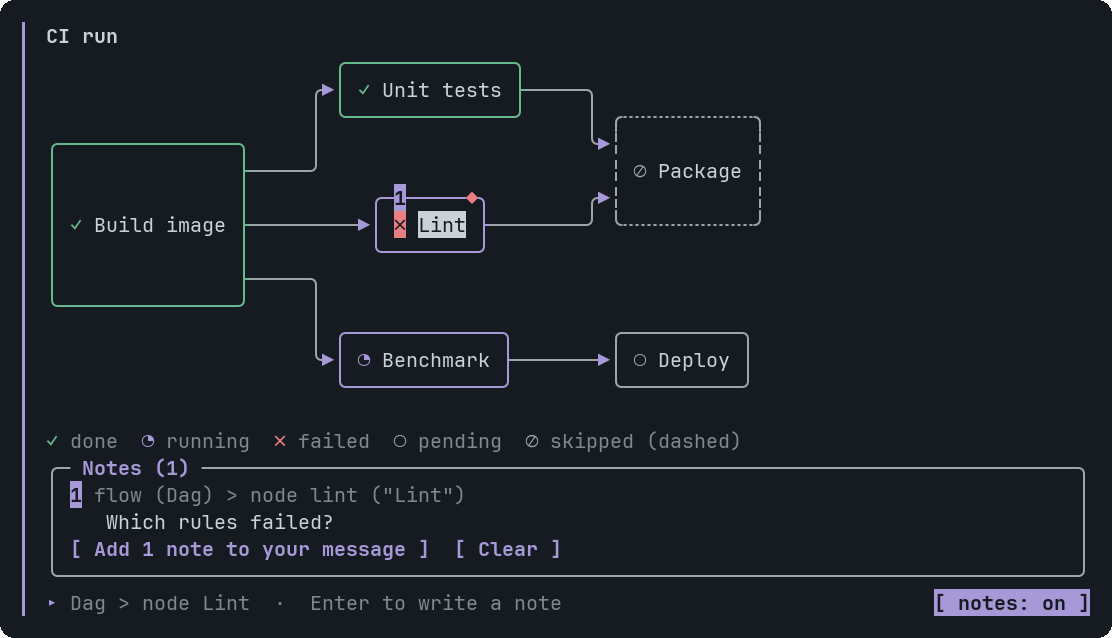
|
|
92
76
|
|
|
93
77
|
1. Click `[ notes ]` under a widget, or run `/openui-notes`.
|
|
94
78
|
2. Click a cell, node, slice or paragraph, or Tab to it and press Enter. pi's own editor opens. Type, press Enter.
|
|
95
79
|
3. Click `[ Add 2 notes to your message ]`, or Tab to it and press Enter. The notes land in pi's message box as a numbered list.
|
|
96
80
|
4. Read it, edit it, press Enter. Nothing is sent before that.
|
|
97
81
|
|
|
98
|
-
</td>
|
|
99
|
-
</tr>
|
|
100
|
-
</table>
|
|
101
|
-
|
|
102
82
|
Each note names its target the way the agent wrote it, for example `tbl` (Table) > row 3, column `State`, so the agent can find
|
|
103
83
|
the line in its own source and answer by number. Words that come from the widget are cleaned before they reach your message,
|
|
104
84
|
so a widget cannot slip an `@file` reference or a code span into something you are about to send.
|
|
105
85
|
|
|
106
86
|
A widget holds 20 notes. They live in memory and are gone when the session ends. Keys, what each component lets you pick, and
|
|
107
|
-
the details are in [docs/interaction.md](docs/interaction.md#notes).
|
|
87
|
+
the details are in [docs/interaction.md](https://github.com/newtonapple/pi-openui/blob/main/docs/interaction.md#notes).
|
|
108
88
|
|
|
109
89
|
## Components
|
|
110
90
|
|
|
111
|
-
|
|
112
|
-
|
|
113
|
-
|
|
114
|
-
<td valign="top" width="25%"><a href="docs/components/LineChart.md"><img src="docs/screenshots/line.png" width="200" alt="LineChart"></a><br><sub>LineChart</sub></td>
|
|
115
|
-
<td valign="top" width="25%"><a href="docs/components/PieChart.md"><img src="docs/screenshots/pie.png" width="200" alt="PieChart"></a><br><sub>PieChart</sub></td>
|
|
116
|
-
<td valign="top" width="25%"><a href="docs/components/GeoMap.md"><img src="docs/screenshots/geo.png" width="200" alt="GeoMap"></a><br><sub>GeoMap</sub></td>
|
|
117
|
-
</tr>
|
|
118
|
-
<tr>
|
|
119
|
-
<td valign="top"><a href="docs/components/Erd.md"><img src="docs/screenshots/erd.png" width="200" alt="Erd"></a><br><sub>Erd</sub></td>
|
|
120
|
-
<td valign="top"><a href="docs/components/SequenceDiagram.md"><img src="docs/screenshots/sequence.png" width="200" alt="SequenceDiagram"></a><br><sub>SequenceDiagram</sub></td>
|
|
121
|
-
<td valign="top"><a href="docs/components/CodeBlock.md"><img src="docs/screenshots/code.png" width="200" alt="CodeBlock"></a><br><sub>CodeBlock</sub></td>
|
|
122
|
-
<td valign="top"><a href="docs/components/RadarChart.md"><img src="docs/screenshots/radar.png" width="200" alt="RadarChart"></a><br><sub>RadarChart</sub></td>
|
|
123
|
-
</tr>
|
|
124
|
-
</table>
|
|
125
|
-
|
|
126
|
-
All 23, with signatures, every argument, a checked example and tips: **[docs/components/](docs/components/README.md)**.
|
|
91
|
+
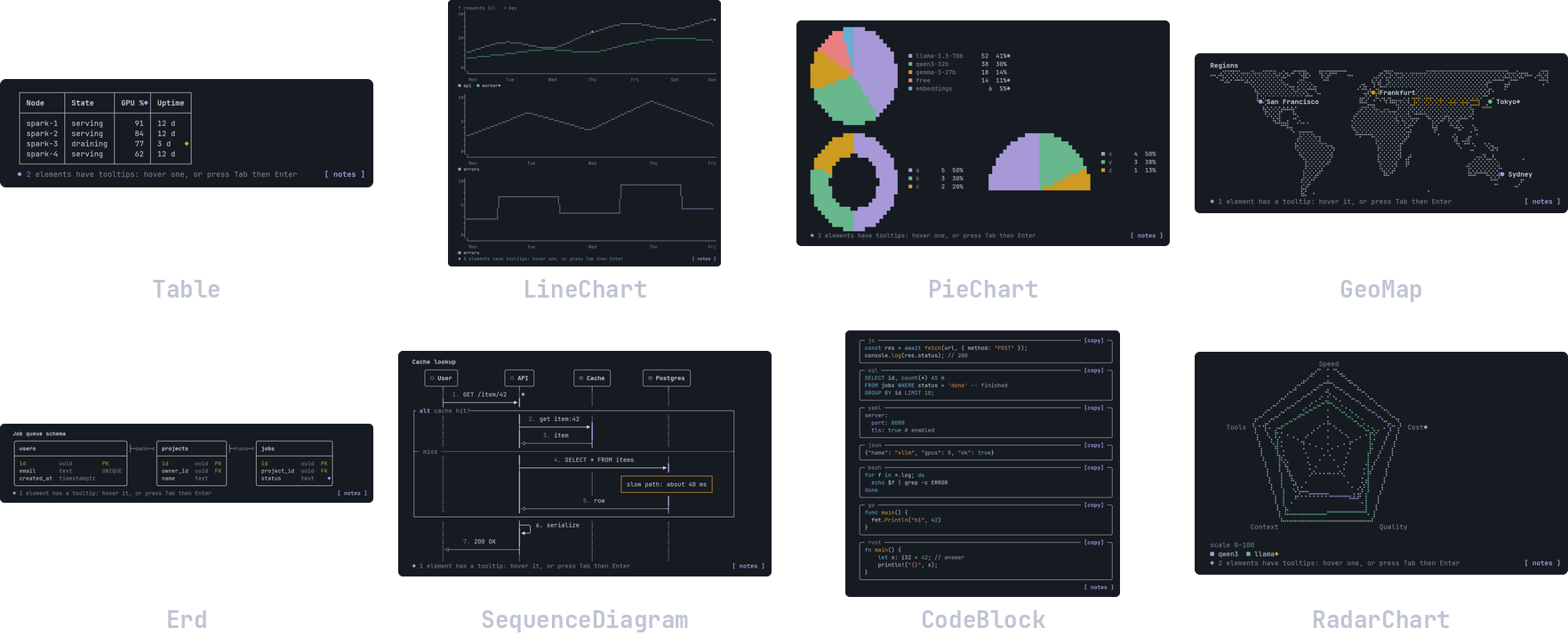
|
|
92
|
+
|
|
93
|
+
All 23, with signatures, every argument, a checked example and tips: **[docs/components/](https://github.com/newtonapple/pi-openui/blob/main/docs/components/README.md)**.
|
|
127
94
|
|
|
128
95
|
| Group | Components |
|
|
129
96
|
|---|---|
|
|
130
|
-
| Layout and text | [Stack](docs/components/Stack.md), [Text](docs/components/Text.md), [Card](docs/components/Card.md), [Callout](docs/components/Callout.md) |
|
|
131
|
-
| Data | [Metric](docs/components/Metric.md), [Table](docs/components/Table.md) |
|
|
132
|
-
| Interactive | [Tabs](docs/components/Tabs.md), [Button](docs/components/Button.md), [Choice](docs/components/Choice.md), [Faq](docs/components/Faq.md) |
|
|
133
|
-
| Rich content | [Markdown](docs/components/Markdown.md), [CodeBlock](docs/components/CodeBlock.md), [Image](docs/components/Image.md) |
|
|
134
|
-
| Charts | [BarChart](docs/components/BarChart.md), [LineChart](docs/components/LineChart.md), [AreaChart](docs/components/AreaChart.md), [PieChart](docs/components/PieChart.md), [RadarChart](docs/components/RadarChart.md) |
|
|
135
|
-
| Diagrams and maps | [Dag](docs/components/Dag.md), [Erd](docs/components/Erd.md), [InfraMap](docs/components/InfraMap.md), [SequenceDiagram](docs/components/SequenceDiagram.md), [GeoMap](docs/components/GeoMap.md) |
|
|
136
|
-
|
|
137
|
-
[Tooltip](docs/components/Tooltip.md) attaches to Dag, Erd, InfraMap, SequenceDiagram, Table, Metric, BarChart,
|
|
97
|
+
| Layout and text | [Stack](https://github.com/newtonapple/pi-openui/blob/main/docs/components/Stack.md), [Text](https://github.com/newtonapple/pi-openui/blob/main/docs/components/Text.md), [Card](https://github.com/newtonapple/pi-openui/blob/main/docs/components/Card.md), [Callout](https://github.com/newtonapple/pi-openui/blob/main/docs/components/Callout.md) |
|
|
98
|
+
| Data | [Metric](https://github.com/newtonapple/pi-openui/blob/main/docs/components/Metric.md), [Table](https://github.com/newtonapple/pi-openui/blob/main/docs/components/Table.md) |
|
|
99
|
+
| Interactive | [Tabs](https://github.com/newtonapple/pi-openui/blob/main/docs/components/Tabs.md), [Button](https://github.com/newtonapple/pi-openui/blob/main/docs/components/Button.md), [Choice](https://github.com/newtonapple/pi-openui/blob/main/docs/components/Choice.md), [Faq](https://github.com/newtonapple/pi-openui/blob/main/docs/components/Faq.md) |
|
|
100
|
+
| Rich content | [Markdown](https://github.com/newtonapple/pi-openui/blob/main/docs/components/Markdown.md), [CodeBlock](https://github.com/newtonapple/pi-openui/blob/main/docs/components/CodeBlock.md), [Image](https://github.com/newtonapple/pi-openui/blob/main/docs/components/Image.md) |
|
|
101
|
+
| Charts | [BarChart](https://github.com/newtonapple/pi-openui/blob/main/docs/components/BarChart.md), [LineChart](https://github.com/newtonapple/pi-openui/blob/main/docs/components/LineChart.md), [AreaChart](https://github.com/newtonapple/pi-openui/blob/main/docs/components/AreaChart.md), [PieChart](https://github.com/newtonapple/pi-openui/blob/main/docs/components/PieChart.md), [RadarChart](https://github.com/newtonapple/pi-openui/blob/main/docs/components/RadarChart.md) |
|
|
102
|
+
| Diagrams and maps | [Dag](https://github.com/newtonapple/pi-openui/blob/main/docs/components/Dag.md), [Erd](https://github.com/newtonapple/pi-openui/blob/main/docs/components/Erd.md), [InfraMap](https://github.com/newtonapple/pi-openui/blob/main/docs/components/InfraMap.md), [SequenceDiagram](https://github.com/newtonapple/pi-openui/blob/main/docs/components/SequenceDiagram.md), [GeoMap](https://github.com/newtonapple/pi-openui/blob/main/docs/components/GeoMap.md) |
|
|
103
|
+
|
|
104
|
+
[Tooltip](https://github.com/newtonapple/pi-openui/blob/main/docs/components/Tooltip.md) attaches to Dag, Erd, InfraMap, SequenceDiagram, Table, Metric, BarChart,
|
|
138
105
|
LineChart, AreaChart, PieChart, RadarChart, GeoMap and Image.
|
|
139
106
|
|
|
140
107
|
## How it works
|
|
@@ -151,7 +118,7 @@ OpenUI Lang --parse--> typed tree --render--> blocks (rows of cells + click targ
|
|
|
151
118
|
- `src/diagram/` is the layout and routing engine for Dag, Erd and InfraMap.
|
|
152
119
|
- `src/pi/` is the pi extension: the tool, the commands, the themed component, mouse and keyboard handling, pictures.
|
|
153
120
|
|
|
154
|
-
More in [docs/design.md](docs/design.md).
|
|
121
|
+
More in [docs/design.md](https://github.com/newtonapple/pi-openui/blob/main/docs/design.md).
|
|
155
122
|
|
|
156
123
|
## Requirements
|
|
157
124
|
|
|
@@ -161,6 +128,16 @@ More in [docs/design.md](docs/design.md).
|
|
|
161
128
|
Mono. A different font works if it has them: `PI_OPENUI_FONT=/path/to/font.ttf npm test` checks yours.
|
|
162
129
|
- Pictures need a terminal that supports the Kitty graphics protocol. Other terminals get a framed placeholder.
|
|
163
130
|
|
|
131
|
+
## If the widget does not appear
|
|
132
|
+
|
|
133
|
+
You see a collapsed `Called render_widget ... + Show details` row and no widget, and the model says the widget was drawn. Another
|
|
134
|
+
extension is drawing the tool call in place of this one. [pi-compact-tools](https://www.npmjs.com/package/pi-compact-tools) does
|
|
135
|
+
this to every tool by default. Tell it to leave `render_widget` alone in `~/.pi/agent/compact-tools.json`, then run `/reload`:
|
|
136
|
+
|
|
137
|
+
```json
|
|
138
|
+
{ "custom_tools": { "exclude": ["render_widget"] } }
|
|
139
|
+
```
|
|
140
|
+
|
|
164
141
|
## Development
|
|
165
142
|
|
|
166
143
|
Working on the code? Start pi in this folder instead of installing it: `.pi/extensions/openui.ts` loads the extension (pi asks
|
|
@@ -175,13 +152,13 @@ After you change the code, run `/reload` in pi. The rest:
|
|
|
175
152
|
```sh
|
|
176
153
|
npm test # a few seconds, no network, no model calls
|
|
177
154
|
npm run docs # regenerate docs/components/ from the signature table
|
|
178
|
-
npm run screenshots # regenerate docs/screenshots
|
|
155
|
+
npm run screenshots # regenerate docs/screenshots/, and the two README composites (needs Python with Pillow, and the font)
|
|
179
156
|
npm run gallery # print every component to the terminal (-- --plain for no colour)
|
|
180
157
|
make help # the release process (check, version, publish, tag, push)
|
|
181
158
|
```
|
|
182
159
|
|
|
183
|
-
Tests are described in [docs/testing.md](docs/testing.md). Releases are described in [docs/releasing.md](docs/releasing.md).
|
|
184
|
-
Contributors and agents working in this repository should read [AGENTS.md](AGENTS.md).
|
|
160
|
+
Tests are described in [docs/testing.md](https://github.com/newtonapple/pi-openui/blob/main/docs/testing.md). Releases are described in [docs/releasing.md](https://github.com/newtonapple/pi-openui/blob/main/docs/releasing.md).
|
|
161
|
+
Contributors and agents working in this repository should read [AGENTS.md](https://github.com/newtonapple/pi-openui/blob/main/AGENTS.md).
|
|
185
162
|
|
|
186
163
|
## Limits
|
|
187
164
|
|
|
@@ -194,7 +171,7 @@ Contributors and agents working in this repository should read [AGENTS.md](AGENT
|
|
|
194
171
|
saved at all.
|
|
195
172
|
- A widget has size limits (100 KB of source, 100 table rows, 60 graph nodes, 30 map nodes, and so on). Over a limit the
|
|
196
173
|
agent gets an error with the number and fixes it. They keep pi fast: it draws every widget on every frame. See the
|
|
197
|
-
[list](docs/components/README.md#size-limits).
|
|
174
|
+
[list](https://github.com/newtonapple/pi-openui/blob/main/docs/components/README.md#size-limits).
|
|
198
175
|
|
|
199
176
|
## License
|
|
200
177
|
|
package/package.json
CHANGED
|
@@ -1,6 +1,6 @@
|
|
|
1
1
|
{
|
|
2
2
|
"name": "pi-openui",
|
|
3
|
-
"version": "0.1.
|
|
3
|
+
"version": "0.1.2",
|
|
4
4
|
"type": "module",
|
|
5
5
|
"description": "Pi extension: interactive dashboards, charts, diagrams and maps in the terminal. The agent draws with OpenUI Lang; you click, hover and pin notes.",
|
|
6
6
|
"license": "MIT",
|
|
@@ -49,7 +49,8 @@
|
|
|
49
49
|
"scripts": {
|
|
50
50
|
"test": "node --import ./test/register-pi.mjs --test --test-reporter=spec test/*.test.ts",
|
|
51
51
|
"gallery": "node scripts/langgallery.ts",
|
|
52
|
-
"
|
|
52
|
+
"width": "node --import ./test/register-pi.mjs scripts/width-table.ts",
|
|
53
|
+
"screenshots": "node --import ./test/register-pi.mjs scripts/shots.ts && python3 scripts/render_shots.py && python3 scripts/hero.py",
|
|
53
54
|
"docs": "node scripts/gen_docs.ts",
|
|
54
55
|
"prepublishOnly": "npm test"
|
|
55
56
|
}
|
package/src/diagram/canvas.ts
CHANGED
|
@@ -1,4 +1,5 @@
|
|
|
1
1
|
// Text measurement and a cell canvas. Pure, no dependencies.
|
|
2
|
+
import { WIDE } from "./wide.ts";
|
|
2
3
|
|
|
3
4
|
const seg: { segment(s: string): Iterable<{ segment: string }> } | null =
|
|
4
5
|
typeof Intl !== "undefined" && (Intl as any).Segmenter ? new (Intl as any).Segmenter(undefined, { granularity: "grapheme" }) : null;
|
|
@@ -7,23 +8,28 @@ export function graphemes(s: string): string[] {
|
|
|
7
8
|
return seg ? Array.from(seg.segment(s), (x) => x.segment) : Array.from(s);
|
|
8
9
|
}
|
|
9
10
|
|
|
11
|
+
/** Whether `cp` is in the generated table of code points pi draws two cells wide (binary search over [first, last] pairs). */
|
|
12
|
+
function isWide(cp: number): boolean {
|
|
13
|
+
let lo = 0;
|
|
14
|
+
let hi = WIDE.length / 2 - 1;
|
|
15
|
+
while (lo <= hi) {
|
|
16
|
+
const mid = (lo + hi) >> 1;
|
|
17
|
+
if (cp < WIDE[mid * 2]) hi = mid - 1;
|
|
18
|
+
else if (cp > WIDE[mid * 2 + 1]) lo = mid + 1;
|
|
19
|
+
else return true;
|
|
20
|
+
}
|
|
21
|
+
return false;
|
|
22
|
+
}
|
|
23
|
+
|
|
24
|
+
/**
|
|
25
|
+
* Columns one code point takes. It must agree with the terminal, or everything to its right on the row slides and the borders
|
|
26
|
+
* come out of line: wide characters (CJK, and the emoji and symbols models like: U+2705 U+274C U+26A1 U+1F680) are two, taken from pi's own width
|
|
27
|
+
* function through src/diagram/wide.ts; marks and controls are none.
|
|
28
|
+
*/
|
|
10
29
|
function cpWidth(cp: number): number {
|
|
11
30
|
if (cp === 0 || cp < 32 || (cp >= 0x7f && cp < 0xa0)) return 0;
|
|
12
31
|
if ((cp >= 0x300 && cp <= 0x36f) || (cp >= 0x200b && cp <= 0x200f) || (cp >= 0xfe00 && cp <= 0xfe0f) || (cp >= 0x20d0 && cp <= 0x20ff)) return 0;
|
|
13
|
-
|
|
14
|
-
(cp >= 0x1100 && cp <= 0x115f) ||
|
|
15
|
-
(cp >= 0x2e80 && cp <= 0xa4cf) ||
|
|
16
|
-
(cp >= 0xac00 && cp <= 0xd7a3) ||
|
|
17
|
-
(cp >= 0xf900 && cp <= 0xfaff) ||
|
|
18
|
-
(cp >= 0xfe30 && cp <= 0xfe6f) ||
|
|
19
|
-
(cp >= 0xff00 && cp <= 0xff60) ||
|
|
20
|
-
(cp >= 0xffe0 && cp <= 0xffe6) ||
|
|
21
|
-
(cp >= 0x1f300 && cp <= 0x1f64f) ||
|
|
22
|
-
(cp >= 0x1f900 && cp <= 0x1f9ff) ||
|
|
23
|
-
(cp >= 0x20000 && cp <= 0x3fffd)
|
|
24
|
-
)
|
|
25
|
-
return 2;
|
|
26
|
-
return 1;
|
|
32
|
+
return isWide(cp) ? 2 : 1;
|
|
27
33
|
}
|
|
28
34
|
|
|
29
35
|
/** Display width of one grapheme cluster (0, 1 or 2 columns). */
|
package/src/diagram/infra.ts
CHANGED
|
@@ -11,7 +11,8 @@ import { drawWires, type WireSpec } from "./wires.ts";
|
|
|
11
11
|
export const INFRA_KINDS = ["client", "gateway", "service", "gpu", "database", "storage", "queue", "cloud"] as const;
|
|
12
12
|
export const INFRA_STATUSES = ["up", "degraded", "down", "unknown"] as const;
|
|
13
13
|
export const INFRA_TONES = ["neutral", "info", "good", "warn", "bad"] as const;
|
|
14
|
-
|
|
14
|
+
// Every icon must be one cell wide in pi (test/width.test.ts): a wide one (the old storage icon, U+2630, was) slides the rest of its row.
|
|
15
|
+
export const KIND_ICON: Record<string, string> = { client: "□", gateway: "↔", service: "◇", gpu: "⌸", database: "◎", storage: "⊟", queue: "≡", cloud: "◌" };
|
|
15
16
|
const STATUS_GLYPH: Record<string, string> = { up: "●", degraded: "●", down: "●", unknown: "○" };
|
|
16
17
|
|
|
17
18
|
export interface InfraNodeIn {
|
|
@@ -0,0 +1,36 @@
|
|
|
1
|
+
// Generated by scripts/width-table.ts from pi's own width function: do not edit. Run `npm run width` after pi updates.
|
|
2
|
+
// The code points pi draws two cells wide, as inclusive [first, last] pairs in ascending order.
|
|
3
|
+
export const WIDE: readonly number[] = [
|
|
4
|
+
0x1100, 0x115e, 0x231a, 0x231b, 0x2329, 0x232a, 0x23e9, 0x23ec,
|
|
5
|
+
0x23f0, 0x23f0, 0x23f3, 0x23f3, 0x25fd, 0x25fe, 0x2614, 0x2615,
|
|
6
|
+
0x2630, 0x2637, 0x2648, 0x2653, 0x267f, 0x267f, 0x268a, 0x268f,
|
|
7
|
+
0x2693, 0x2693, 0x26a1, 0x26a1, 0x26aa, 0x26ab, 0x26bd, 0x26be,
|
|
8
|
+
0x26c4, 0x26c5, 0x26ce, 0x26ce, 0x26d4, 0x26d4, 0x26ea, 0x26ea,
|
|
9
|
+
0x26f2, 0x26f3, 0x26f5, 0x26f5, 0x26fa, 0x26fa, 0x26fd, 0x26fd,
|
|
10
|
+
0x2705, 0x2705, 0x270a, 0x270b, 0x2728, 0x2728, 0x274c, 0x274c,
|
|
11
|
+
0x274e, 0x274e, 0x2753, 0x2755, 0x2757, 0x2757, 0x2795, 0x2797,
|
|
12
|
+
0x27b0, 0x27b0, 0x27bf, 0x27bf, 0x2b1b, 0x2b1c, 0x2b50, 0x2b50,
|
|
13
|
+
0x2b55, 0x2b55, 0x2e80, 0x2e99, 0x2e9b, 0x2ef3, 0x2f00, 0x2fd5,
|
|
14
|
+
0x2ff0, 0x3029, 0x3030, 0x303e, 0x3041, 0x3096, 0x309b, 0x30ff,
|
|
15
|
+
0x3105, 0x312f, 0x3131, 0x3163, 0x3165, 0x318e, 0x3190, 0x31e5,
|
|
16
|
+
0x31ef, 0x321e, 0x3220, 0x3247, 0x3250, 0xa48c, 0xa490, 0xa4c6,
|
|
17
|
+
0xa960, 0xa97c, 0xac00, 0xd7a3, 0xf900, 0xfaff, 0xfe10, 0xfe19,
|
|
18
|
+
0xfe30, 0xfe52, 0xfe54, 0xfe66, 0xfe68, 0xfe6b, 0xff01, 0xff60,
|
|
19
|
+
0xffe0, 0xffe6, 0x16fe0, 0x16fe3, 0x16ff2, 0x16ff6, 0x17000, 0x18cd5,
|
|
20
|
+
0x18cff, 0x18d1e, 0x18d80, 0x18df2, 0x1aff0, 0x1aff3, 0x1aff5, 0x1affb,
|
|
21
|
+
0x1affd, 0x1affe, 0x1b000, 0x1b122, 0x1b132, 0x1b132, 0x1b150, 0x1b152,
|
|
22
|
+
0x1b155, 0x1b155, 0x1b164, 0x1b167, 0x1b170, 0x1b2fb, 0x1d300, 0x1d356,
|
|
23
|
+
0x1d360, 0x1d376, 0x1f004, 0x1f004, 0x1f0cf, 0x1f0cf, 0x1f18e, 0x1f18e,
|
|
24
|
+
0x1f191, 0x1f19a, 0x1f1e6, 0x1f202, 0x1f210, 0x1f23b, 0x1f240, 0x1f248,
|
|
25
|
+
0x1f250, 0x1f251, 0x1f260, 0x1f265, 0x1f300, 0x1f320, 0x1f32d, 0x1f335,
|
|
26
|
+
0x1f337, 0x1f37c, 0x1f37e, 0x1f393, 0x1f3a0, 0x1f3ca, 0x1f3cf, 0x1f3d3,
|
|
27
|
+
0x1f3e0, 0x1f3f0, 0x1f3f4, 0x1f3f4, 0x1f3f8, 0x1f43e, 0x1f440, 0x1f440,
|
|
28
|
+
0x1f442, 0x1f4fc, 0x1f4ff, 0x1f53d, 0x1f54b, 0x1f54e, 0x1f550, 0x1f567,
|
|
29
|
+
0x1f57a, 0x1f57a, 0x1f595, 0x1f596, 0x1f5a4, 0x1f5a4, 0x1f5fb, 0x1f64f,
|
|
30
|
+
0x1f680, 0x1f6c5, 0x1f6cc, 0x1f6cc, 0x1f6d0, 0x1f6d2, 0x1f6d5, 0x1f6d8,
|
|
31
|
+
0x1f6dc, 0x1f6df, 0x1f6eb, 0x1f6ec, 0x1f6f4, 0x1f6fc, 0x1f7e0, 0x1f7eb,
|
|
32
|
+
0x1f7f0, 0x1f7f0, 0x1f90c, 0x1f93a, 0x1f93c, 0x1f945, 0x1f947, 0x1f9ff,
|
|
33
|
+
0x1fa70, 0x1fa7c, 0x1fa80, 0x1fa8a, 0x1fa8e, 0x1fac6, 0x1fac8, 0x1fac8,
|
|
34
|
+
0x1facd, 0x1fadc, 0x1fadf, 0x1faea, 0x1faef, 0x1faf8, 0x20000, 0x2fffd,
|
|
35
|
+
0x30000, 0x3fffd,
|
|
36
|
+
];
|
package/src/lang/docs.ts
CHANGED
|
@@ -502,7 +502,7 @@ r = Relation("users", "projects", "1:N", "owns")`,
|
|
|
502
502
|
"InfraZone.tone": "Tints the zone: `neutral` (default), `info`, `good`, `warn`, `bad`.",
|
|
503
503
|
"InfraNode.id": "Unique across the whole map. Links use it.",
|
|
504
504
|
"InfraNode.label": "Bold text in the box.",
|
|
505
|
-
"InfraNode.kind": "Picks the icon: client □, gateway ↔, service ◇, gpu ⌸, database ◎, storage
|
|
505
|
+
"InfraNode.kind": "Picks the icon: client □, gateway ↔, service ◇, gpu ⌸, database ◎, storage ⊟, queue ≡, cloud ◌.",
|
|
506
506
|
"InfraNode.status": "`up` (green dot), `degraded` (amber), `down` (red) or `unknown` (hollow, dashed box). Omit it for no dot.",
|
|
507
507
|
"InfraNode.detail": "A short second line, such as a port or a count.",
|
|
508
508
|
"InfraLink.from": "The id of the node where the arrow starts (marked with a dot).",
|